
Awarapan 2 Movie Poster Photo Prompt for Cinematic AI Edits
Movie poster-style photos are becoming a big trend among Indian photo editing fans. Dark backgrounds, emotional expressions, cinematic lighting, and dramatic scenes can make a normal portrait look more like a film poster.
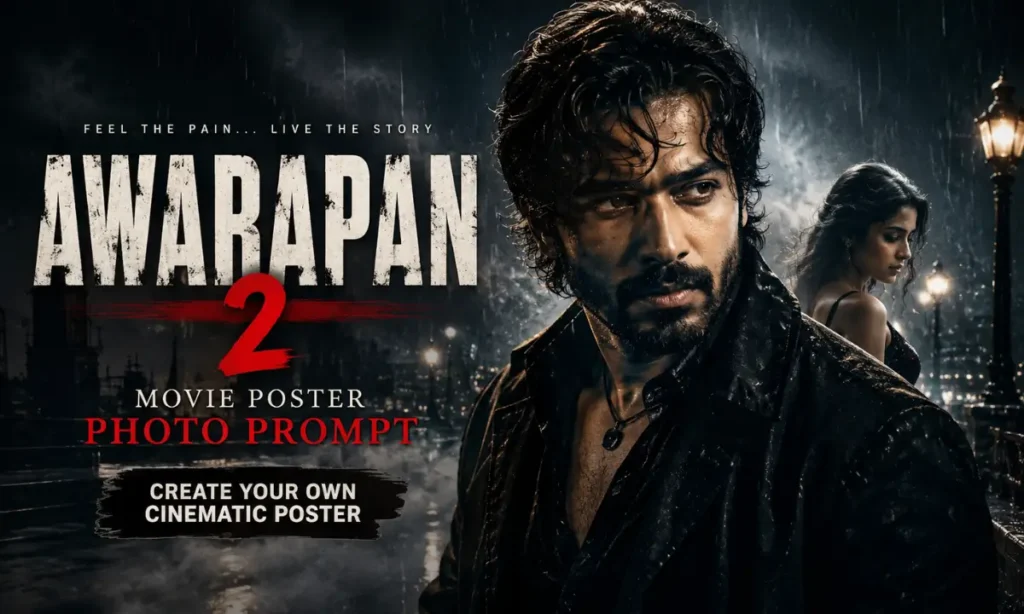
The Awarapan 2 Movies Poster Photo Prompt is designed for people who want this dark and emotional cinematic look. You can use your own photo and transform it into a Bollywood-inspired poster with the help of modern image generation and photo editing tools.
This Emran Hasmi movie poster trend is especially popular on Instagram, where cinematic portraits, dramatic edits, and movie-style photos often get strong attention.
What Is the Awarapan 2 Movies Poster Photo Prompt?
The Awarapan 2 poster style focuses on mood and emotion. It usually uses dark tones, strong shadows, atmospheric smoke or mist, and an intense facial expression.
The goal is not to copy an official movie poster exactly. Instead, the prompt helps create an original cinematic poster inspired by dark Bollywood romance and action-drama visuals.
You can customize the result with your own pose, clothes, background, lighting, and text. This makes every generated poster feel more personal. Also check: 15 August Motu Patlu AI Name Video Prompt & Mera Prompt.
Why Is This Cinematic Poster Trend Popular?
The Awarapan-inspired poster trend feels different from a normal photo edit. It adds a story-like feeling to a single image. Dark color grading, rain, smoke, and dramatic lighting can make the photo look more intense.
Movie-poster prompts have also become popular because modern image tools can transform a personal photo into a cinematic composition without requiring advanced Photoshop skills. Clear instructions about the subject, mood, lighting, color grade, and empty space for text can improve the final poster layout.
For fans of Bollywood-style photo editing, this type of image works well for Instagram posts, profile pictures, Stories, Reels covers, and social media sharing.
Awarapan 2 Movies Poster Photo Prompt
Below is a custom prompt for creating an original dark cinematic poster with your uploaded photo.
Alternative Awarapan 2 Poster Prompt
Want a slightly different look? Try this version.
How to Create an Awarapan 2 Style Poster Photo
Creating this type of image is simple.
- Choose a clear photo. A high-quality portrait usually gives better facial details.
- Open your preferred image generation or photo editing tool. Tools such as ChatGPT or Google Gemini can be used where image editing features are available.
- Upload your photo.
- Copy one of the prompts from this article.
- Paste the prompt with your image.
- Generate a few versions.
- Choose the best result and add custom text if needed.
For a more authentic movie-poster layout, portrait-oriented compositions such as 2:3 are commonly used, and leaving space for the title can prevent text from covering the main subject.
Tips for Better Movie Poster Results
A few small changes can improve your final image.
- Use a sharp, well-lit reference photo.
- Keep the face clearly visible.
- Ask the tool to preserve facial identity naturally.
- Use one clear mood instead of mixing many styles.
- Add smoke, rain, fog, or city lights only when they support the scene.
- Leave space for the movie title.
- Generate more than one version before choosing the final image.
- If the generated title has spelling mistakes, add the text later with a photo editing app.
Long and overly complicated prompts do not always produce better results. A clear subject, defined genre, lighting direction, color treatment, and composition instructions are often more useful.
Final Words
The Awarapan 2 Movies Poster Photo Prompt gives your normal portrait a dark, emotional, and cinematic movie-poster feel. You can experiment with rain, smoke, dramatic shadows, close-up portraits, and different background scenes to create a unique result.
Try both prompts and adjust the mood according to your photo. A simple change in lighting or background can give your poster a completely new look. The key is to keep the face natural while building a strong cinematic atmosphere around it.

3 Comments